


 Today i will tell you about a computer problem. When you start up your computer, have you ever found, dark screen that looks old fashioned DOS type with white text on a black background (as seen in left picture). Dark screen explain something about computer model Software, such as Pentium(R) 4 , Bios version, memory etc etc. but the simple message is
legacy keyboard - detected
legacy mouse - detected
USB Legacy - Enabled
It informs me to strike the "F4 Key" to continue and setup computer settings. When I do, it's take me to Bios Setup Page.
So lets back to the topic that How i found this problem.
1. When main power switch on for my room, Computer turn on automatically without press power button on CPU. ( Normally have to press power button on CPU)
2. Computer screen shows dark screen that looks old fashioned DOS type with white text on a black background. Dark screen explain something about computer model Software, such as Pentium(R) 4 , Bios version, memory etc etc. but the simple message is
legacy keyboard - detected
legacy mouse - detected
USB Legacy - Enabled
It informs me to strike the "F4 Key" to continue and setup computer settings.
3. When I do, it's take me to Bios Setup Page.
4. I tried to change some settings Bios setup page
then press F10 for save and exit from setup page. but it's worthless and problem occur many time or many days when i turn on main power switch in room. So every time i press F10 for save and exit. I thought it's some kind Virus and etc....
5. as i am not expert in computer so i search this problem in Internet. and i did found some question and answer about it. but most of them describe you computer and bios setup. which is i found quite difficult to understand because as i told you i am not an expert in computer. Only few answer are telling you what to do for the problem.
6. I recall few years ago one of my friend help me for change bios battery, so decide to change bios battery. So i went Powerbuy ( IT and electronic store in Thailand) and bought Lithium battery 3V ( model #2032) and change. Then problem is gone so fast...
7. Note: also notice your Computer time, if it's slower or give you wrong time even you set it everyday. So if your computer also behave as i told you above or computer time and date is slower then local time. it might be the time for change New battery. I told this problem to my friend he don't believe me he ask me where do you put this Lithium battery. :) I hope you know where is the Lithium battery. battery is in Motherboard.
These are few advise from me if you ever get the same problem . try to think when you have change your Bios battery ? or never change?

If you owned Laptop. you may have made and collect Music and movies library in it. Do you use your laptop for your Work Such as video-editing, sound-editing or playing games. Did you ever notice that your Laptop is working slowly then before. Because when you Edit video or Sound editing, it need very big space. Of course you have huge collection of Music files. so you can enjoy watching movie or listen music that you like whenever you like to see and wherever. But do you know that saving lots of Huge files also cover lots of memory space and dramatically reduce it's Performance. And also can be harm your Laptop, read here dell memory upgrade. So what do you do if your Laptop performance is too slow ? Are you going to delete your Video project or Stop editing music on your laptop ? and use laptop just only to check your mail in your inbox ? Don't be silly, you don't have to stop your work or neither have to delete any favorite files, i have better solution for your Laptop that Just only upgrade Laptop Memory which Dramatically Improves it's Performance.
If you like to know I will recommend to visit Laptop Memory Upgrade site to check your Laptop Memory Upgrade Configurator
This Site is recommend to me by a friend. He use dell Laptop. So he did dell memory upgrade. He said, we can scan our Laptop to find RAM type. We can scan all model and all Manufacturer Laptop.
Laptop Memory Upgrade, carry all the major brands Laptop Memory Upgrade. you can upgrade RAM for Sony, Toshiba, Fujitsu, Dell Laptop Memory, HP Laptop Memory, Compaq Notebook RAM, IBM memory and for all major Brand Laptop Memory Upgrade with Lifetime Warranty. offer Best price.
For example if you select Dell Laptop. See the varity of Dell Memory RAM. So
Dell memory upgrade is the fast and most cost effective way to improve the performance of your Dell laptop, Upgrading Laptop RAM Improves Windows Performance and Increases Speed too.
Visit Dell memory upgrade to get Online Live support for your Laptop. Upgrade your Laptop Memory and use it as it's meant to be.
Print This Page
 Few days ago I bought 16GB Micro Vault Click USB Flash Drive. I like the design of the Micro Vault Click USB Flash Drive. The "click" feature is perfect for protecting connector while not in use, similar to the clicking action of a pen. A bright prism LED is also illuminated while in use, letting you know your data is being transferred safely. Micro Vault Click USB Flash Drive is available in 1GB, 2GB, 4GB , 8GB and 16GB.
actually i am looking for just only 8 GB USB Flash Drive , I did not thinking to buy Sony Flash drive at first. I was thinking about any flash drive with the good price. but when i see the Sony's Micro Vault Click USB Flash Drive, i suddenly decide to buy Sony Flash Drive.
This Flash drive includes Virtual Expander to virtually store three times more information by automatically compressing data. And very easy to use just plug Micro Vault Click USB flash drive into your compatible PC and store your data with ease.
This Flash Drive is Pre-loaded with data compression software.


Micro Vault Click USB flash drive Features

16GB1 capacity
Sleek, convenient one piece design
New auto retractable USB connector
Plugs directly into USB 2.0 and 1.1 ports
Enhanced for Windows® ReadyBoost™
Illuminated Prism LED glows when in use
Pre-loaded with Virtual Expander to virtually store 3 times as much data2
Compatible with Windows Vista Home Basic/Home Premium, Business, Enterprise,
If you thinking about buying USB Flash Drive Take look on Sony's product
Print This Page Continue Reading...
I have just post a post about Picture Make Up in just 1-2-3 steps .
So here is How To make up your pictures, visit PHOTOFUNIA (visit the website first) .
1. Then Select the Effects that you like from more then 136 effects. these effects use face detection technology. so it is necessary that the face on the photo is front facing. If there is more than one face on the photo then the first in the row will be chosen.

 2.After select desire effect page open like below with your effect at the side #1 effect with Bank Note. and #2 effect David Beckham. So i will show you example with #2 effect. Browse the picture from your computer. (my selection picture is left picture Aum Patchara Thai Actress)
 NOTE: For the given effect, it is necessary that the face on the photo is front facing, well lit, not blurred and not covered by anything (a good example - your passport photo). Preferably, the photo's background should be neutral. If there is more than one face on the photo then the first in the row will be chosen.
3. After you click its Take just only few seconds normally it's load instantly. If the picture chosen is high pixel it's take little time so i recommend make your picture small before use effect , you will save lots of time.

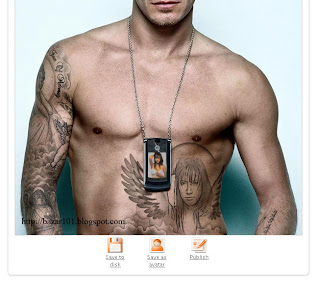
Picture is ready to share with your friends or use as avatar in forums or HI5 , or Just save it in your computer for future sharing. Some Picture you can print too.
Other Effect Using the Same Picture


Hope this post help you to edit your Picture online in few easy steps.
If you like to share your edited picture in my Blog you are welcome plz contact me.
hope you liked this post
It's holiday Seasons, Christmas and then New year celebration. After a long exasperating year, Christmas and new year is coming up with new enthusiasms and contentment for all of the people around the world. Christmas brings a new life to every one who wants to revolutionize their life or want to revive their life.
All the people working around the world to assemble together with their beloved ones and family and enjoy the very commencement of new life or rejuvenated life. Of course we took lots of Pictures to keep these events in our Memory.


 I just know about a site which is very easy to make up picture without knowing any photoshop tricks. And pictures looks so professional(like Pro-user edit in photoshop), but don't worry you don't need to use any photoshop. Above Pictures are edit pictures. and Pictures on the write is the original. Did you see the difference. It looks so real. So If you are intrested Website is http://photofunia.com/ .
This website have more then 130 effects collection, choese as you like. You can make up your picture with in a minute it's uplode picture so fast You can make up your picture in just only 1-2-3 steps . Visit tutorial post How to use Photofunia ?
you can also share pictures to many community website ie: hi5, myspace, and many more.
Print This Page Continue Reading...
 When i was small kid, my brothers Bought me a Tetris game or brick game in mini screen with Keychain. That was fun i can carry my game everywhere in my pocket . Whoever saw that small brick game they just love to have one like mine.
Come to main topic. When i saw the Coby 1.5 inch Digital Photo Frame Keychain . i just remember my childhood.
Now wherever we go, we carry our and take lots of pictures and it's very easy to share those pictures with our family and friends. we can save thoese pictures in our Computer and watch when ever we want. but what happens when we are not at home or we left for travel. We may take some pictures to see but how many pictures of our loved ones can carry in our wallet?
The Coby 1.5 inch Digital Photo Frame Keychain 
Windows compatible. Uses integrated rechargeable Lithium-ion Battery. High-resolution 1.5" screen provides bright images and an excellent viewing angle. So why load up your wallet with pictures when the Coby DP151 Digital Photo Frame Keychain
Print This Page
Can you Imagine life without Computer, after you get use to it in your everday life . I think answer will be No . we are using Computer for every work and we store everything in our computer. many of them are very important and we have to use it very often. But what if Something happpen with our computer and all the Data Will lost for forever. Can you Imagine How much you will loose any way it's 21 st century .
Tilana make online storage useful, provide enterprise-class functionality in an online application service provider (ASP) model that's accessible to the small business and consumer PC user.
Unique product concept
 Tilana combine continuous data protection with off-site storage, version history, Web access, and multi-computer synchronization into one affordable service.
San Diego based Tilana Systems Corporation solves the universal problem of data protection and synchronization.
Tilana Reserve™ brings enterprise-class file synchronization and protection into reach for the home user and for the small to medium-sized business.
Most services offering "unlimited backup" for a few dollars per month do not offer the ability to archive any data if it's deleted from your protected computer. Unlimited "backup" is not unlimited "storage." Always read the fine print.
 Tilana Reserve is your storage solution for life, not just a place to keep a copy of what still hasn't filled up your computer. For only $2 per GB you can store as much or as little as you want, for as long as you want to keep your account in good standing at only $19.95 per month. Keep collecting and generating any kind of files you want. Buy more storage space only as needed along the way.
Tilana Reserve stores version history
Each time you save your work, Tilana Reserve protects and saves the change in a remotely stored version history. Use the Cleanup Wizard to easily and quickly delete old file versions in batches, optimizing your use of Tilana Reserve storage space.
 remote file access Get any file or folder in a previously saved state, within seconds via the desktop software on a protected computer. Securely login from any computer online, and browse through your folders, files, and file version histories to retrieve anything stored in Tilana Reserve. Even files deleted from all of your computers, and archived in Tilana Reserve remain stored with as much of their protected version histories intact, and for as long as you want them to be.
Print This Page Continue Reading...
Hi Guys, isn't it a funny Topic ? you will understand why this Topic is So funny read for know why.
It's Been Long Time I haven't Get Any Topic to write. But I am online Everyday and busy with other Blogs Tibet Arts , Tibet Shop and Tibet Arts In Thailand.
My aim for This Blog is Inform you about The Tricks how to Earn money online and Earn for myself . And some tricks That i have advise is really works Like Google AdSense program, Amazon Associates Program, Blogsvertise more....
Recently I did recommend( Shareapic Where sharing is rewarded ) earn money program from Hosting Your Picture at Shareapic . Publisher get paid for hosting their Picture online and share with friends and others. But their Payments are Too low to make a dollar. Shareapic pays US$ 0.22 for every 1000 image views. I guess it's very low to get any money from them(see right pictures for my Income From Shareapic Period about 2 Months) I earned only 0.13 cents. Compare to google adSence It's Too low, isn't it? I remember One of my blogger friend forumer told me,"Inform me If you ever receiving from Shareapic."
Now I understand what does he mean. It's too low paid program.
But another hand we can upload many pictures as much as we want easy to upload and paste anywhere we want and share with friends and family. so I recommend This site again for Host your Image at Shareapic but don't Hope earning any money by sharing your Pictures Online .
And My request for Shareapic Plz Increase your paying.
Hi friends, - Upload unlimited pictures - No file size restrictions
Many of you are using digital camera in your everyday life. and some people use may be once while . but all we love to share our Pictures with friends and family. So we need Photo upload websites, there are many free photo upload website ie: Imagevenue.com, photobucket.com, rapidshare.com, shareapic.com and many more... they are giving space for free upload your pictures to share with your friends and family or to post in your Blog,website and online profiles site like my space and hi5 etc.
Shareapic is a free service that allows its users to upload and host images on it's servers. What makes shareapic different from the rest? Shareapic has a unique revenue sharing model that compensates users for directing their friends and family to see their hosted images. When a member hosts a gallery, they can then show this gallery to others. Each time this is done, the member is paid. Also Visit Share your Pictures online .
If you like to photography and want to share with your family , friends or with whole world. Then there is many websites gives you fre space for upload your Pictures to some free based sharing files site then copy paste Image links to desire place. All websites give you free space for share your pictures.
But wait there is one website SHAREAPIC , Who give you Cash For your Pictures When you Upload and share Your Pictures online. So why Don't u share pic online using shareapic .
There are more Reasons to join Shareapic
- Create unlimited galleries - Pay out within 7 days!
- They pay $0.22 per 1000 pic views.. that's more than some major ad
networks pay their publishers!
- We allow you to add your Google Adsense © code to your image and gallery pages.
- One click posting to Myspace, Blogger, Xanga, Hi5, and more! 


 Posts


