


 Hope you remember my previous post "Beware Facebook Chat Link" , where we have talk about the link that harm your computer and your Facebook account. So here again i and some other friends receiving similar links on Facebook chat box. so i thought i must inform about this Spam link. This time it is not a virus but its viral spam links. It is a new stalker apps.
This apps claim to show users who, among their friends, is regularly visiting their page.
This is the page you will see when you click those links.
Once you are click those links and it tell you to install or even install without telling you. then your account is start sending same message and links to all your friends in your contacts list ( like picture below). This is not danger as virus or malware but just annoying your friends. beware sometime time your account can be banned for a while.
Chat box is looks like this.
what to do if you are infected by stalker apps ?
I am not an expert but as this is an application so removing this from your Facebook account might be solved your problem.
How to remove Application from Facebook account. follow the steps below
1- Go to your Facebook home page, click where it says "Account", this is located on the Top right of your screen.
2- Then click over Privacy Settings,
3- Once you're there scroll down and go to the bottom left, there you'll see a link that reads "Applications and Websites",
4- Click where it says "Edit your Settings". You'll be redirected to the "Applications, Games and Websites" Page. There you'll see a list of the applications that you have installed on your Facebook Account.
5- Under the applications you'll see an "X" and a text that reads: "Remove unwanted or spammy applications". Click over the word "Remove".
6- Finally you select the “X” on the right side where it says "stalker apps" or the name of the application that you want to remove.
About this apps, Facebook said: "Don't believe any applications that claim they can show you who's viewing your profile or photo. They can't."

Hi guys,
Recently i received several chat message with link
(see picture bellow ) from my contacts friends. This is just an Idea of Chat Box and the link how its looks like. The person in this picture is in my friend list but this was an auto send chat message.
If you click the Link then your Id is also infected by this virus or malware and automatically your Id will start to send same links to the other contacts in your friends list. 
Chat message from my contacts friends
If your computer is infected by this Links, also effect the skype id too. Because it's happen to me before and i have to scan my computer and change all the password.
Purpose of this post to beware you and also share this post with your friends. I guess the person in the picture is infected by her own friends. which i saw posted same links yesterday by other friends. i try to chat back and tell them change the passwords but they are offline. This is automatic send chat message so even person offline it's send the virus....
Also Read Beware Facebook Chat Link part 2
If you are infected try to load this Malwarebytes' Anti-Malware. search in google.
This post is posting by using Internet Tethering on iPhone 4. If you own iPhone 4, then you don't have to have be a member of different internet service at your home computer. save some money by using Internet Tethering application from your Iphone 4 or 3Gs . i am not sure if it's work with normal iPhone.
To use Internet Tethering you must have internet package with your service provider. which u must have if you surf Facebook or twitter on your iPhone. for example my service provider is True Move and i took iPhone Package ( per month 599 bhat /unlimited WiFi, edge, and 3G + calling 300 minute .... etc.
So by using Internet Tethering for surf internet, i don't have to pay another 599 bhat for internet service at my room. plus save service charge for join internet line at condominium. True move 3G internet give me about 1 mbps speed its depends some time. but in this speed you can watch YouTube video very well,
below picture is at the time i am posting this post.
How to use Internet Tethering in PC or desktop computer? i will be discuss in next post.

It's been Long time i have not blogging, You can see my previous post about Korean Girly Band Girls Generation. Hope you enjoyed That post.
Today i am not going to post another Picture post for SNSD Group but to give you some information about Digital SLR Close-up and Fisheye Converter lens Which comes in less then $30.
So i am trying to post some links from Amazon, where you can buy this Lenses. Visit my previous post about SONY DSLR Lenses and Lens Technology
Here are Some Lenses Which Come in Less Then $30 at Amazon.
Ultra Wide Angle Fisheye Converter Lens:
The new Opteka High Definition Lens increases the versatility of your existing lens to provide breathtaking ultra wide angle views. And it's so easy to use! Additionally the built-in detachable macro lens allows you to take extreme high resolution close-up shots!
another Best part of Opteka Lens is It's Under $30, isn't it great? Opteka made Lenses for Sony, Canon, Nikon and more... 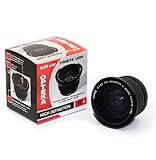

Opteka .35x HD² Super Wide Angle Panoramic Macro Fisheye Converter Lens for Canon EOS Digital Rebel XT, XTi, XS, XSi, & T1i Digital SLR Cameras
Nothing changes the way you see the world like High Definition and no company does High Definition like Opteka. Opteka's glass optics define High Definition. Change the way you view the world. Enjoy outstanding detail, enjoy enhanced clarity, enjoy Opteka! 

The new Opteka High Definition.35x Ultra Wide Angle Fisheye Converter Lens increases the versatility of your existing lens to provide breathtaking ultra wide angle views. And it's so easy to use! Additionally the built-in detachable macro lens allows you to take extreme high resolution close-up shots!
Opteka 10x 58mm and 10x 55 Close-up lens 


The Close-Up lens, which is simply mounted in the front of our normal taking lens, permits the taking of close-ups and also makes possible the photography of details which would be quite impossible without using the Close-Up lens. The easy to use solution for getting extra close. These lenses enable you to get much closer than the minimum focus of the standard camera lens - as close as 4 inches from the subject. This lens is ideal for cataloging small items and focusing on details.
coming soon.......
Print This Page


 Posts
Posts


